

By Multimedia Desk
Published: November 1, 2026
Main Facts: WhatsApp Rolls Out Transformative Features
WhatsApp, indisputably the cornerstone of digital communication and daily information sharing, has introduced a comprehensive suite of updates designed to overhaul how users interact within group chats and virtual meetings. According to data from We Are Social’s Digital Report 2026, a staggering 96 percent of internet users in Colombia—and a similarly dominant percentage across Latin America—engage with the platform daily. Capitalizing on this massive user base, the Meta-owned application has officially deployed four major features aimed directly at resolving long-standing user grievances regarding group management, message retention, and video conferencing versatility.

The most notable shift in this latest update brings WhatsApp closer to professional collaboration tools like Zoom and Microsoft Teams. Users can now generate direct-access video call links, allowing individuals—even those without a personal WhatsApp account—to join meetings seamlessly. Furthermore, the update introduces flexible message pinning, an innovative way to share conversation histories with late joiners, group-exclusive status updates, and a dedicated mentions filter to streamline high-volume interactions.
Industry experts note that these features signify WhatsApp’s evolution from a simple instant messaging application into a comprehensive ecosystem capable of handling both casual social circles and professional remote environments.

Chronology: The Road to Modernizing WhatsApp
For years, WhatsApp’s core architecture remained relatively rigid, prioritizing end-to-end encryption and speed over complex group-management tools. However, the post-pandemic boom in remote work and virtual socialization shifted user expectations dramatically.
- Late 2023: WhatsApp introduced basic high-definition (HD) media sharing and initial iterations of pinned messages, though these earlier tools were constrained by tight expiration timelines (capped at a maximum of 30 days), which drew frequent criticism from power users who relied on groups for archiving important data.
- Mid-2024 to 2025: As competitors like Telegram and Signal introduced advanced folder management, interactive polls, and superior broadcast channels, WhatsApp accelerated its developmental pipeline. Beta rollouts throughout 2025 tested persistent pinning and guest-link architecture.
- November 2026: Meta officially deployed the comprehensive group-and-call update globally. In regions like Colombia, where the application serves as the primary infrastructure for small businesses, educational institutions, and family organizations, the update represents the most substantial functional overhaul in years.
Supporting Data: The Dominance and Demand for Better Tools
To understand the weight of these updates, one must examine the sheer scale of WhatsApp’s footprint.

- 96% Adoption Rate: In markets like Colombia, nearly all active internet users depend on the platform for daily coordination, eclipsing traditional email and competing messaging apps.
- 32-Participant Limit: The enhanced video calling infrastructure now reliably supports up to 32 simultaneous participants with stable audio and video feeds, positioning it as a viable alternative for medium-scale webinars, family gatherings, and corporate check-ins.
- The "Late-Joiner" Gap: Historically, adding a new member to an active group meant they missed context entirely, forcing existing members to manually forward text blocks, documents, or instructions. The new historical-sharing protocol addresses a friction point that affected millions of academic and corporate project groups daily.
Official Responses and Technical Rollout
In its official developer blog, Meta emphasized that these updates were directly inspired by user feedback collected over the past two years.
"We are listening closely to how communities, families, and workplaces utilize WhatsApp to organize their lives," representatives stated in the release notes. "These new features bridge the gap between casual chatting and structured productivity, ensuring that important information is never lost in the stream of daily conversation."

How to Access the New Features
Because these updates are tied to the most recent version of the client software, experts recommend the following steps:
- Check for Updates: Visit the Google Play Store (for Android devices) or the Apple App Store (for iOS/iPhone) to verify that your application is running the latest build.
- Geographical and Ecosystem Delays: Rollouts frequently occur in stages. Users in certain regions or those communicating with contacts running older software versions may experience brief delays before all features synchronize across active group chats.
Detailed Breakdown of the Four Core Features
1. Persistent Pinned Messages
Previously, pinned messages were subjected to a rigid 30-day expiration window. Under the new update, users can pin crucial messages—such as physical addresses, project deadlines, corporate guidelines, or emergency instructions—indefinitely.

- How to use it: Open the desired group chat, press and hold the specific message, tap "More," and select "Pin." You can then choose a custom duration or leave it permanently anchored to the top of the chat interface until manual removal.
2. Historical Context for New Members
When a new participant is added to an ongoing conversation regarding a group trip, a joint purchase, or a long-term project, they are no longer left in the dark.
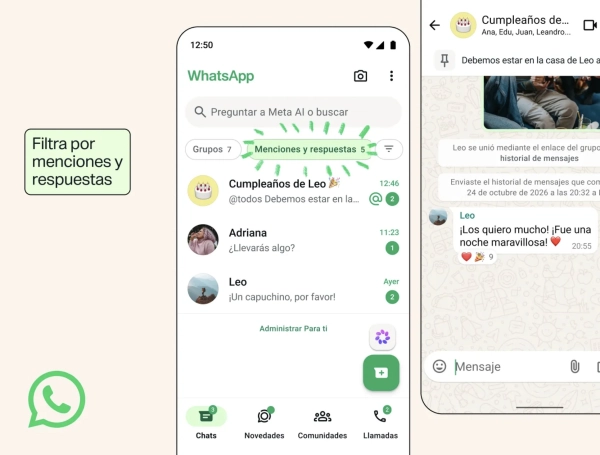
- How to use it: Tap the newly added contact’s name within the chat interface and select the option to share recent history. This transfers prior context, ensuring seamless onboarding without manual forwarding.
3. Group-Exclusive Status Updates
Privacy and compartmentalization are at the heart of this feature. Users can now broadcast ephemeral status updates (which disappear after 24 hours) targeted only at specific group members rather than an entire global contact list.
- How to use it: When publishing a status update from within a group chat interface, the application prompts you to choose between sharing it publicly with all contacts or restricting it exclusively to that specific group (e.g., a gym or running club).
4. Advanced Mentions Filter and "Zoom-Style" Guest Links
Managing high-volume chats has historically led to notification fatigue. A new master filter on the main chat screen aggregates every conversation where you were directly named, replied to, or where the @everyone tag was utilized.
Coupled with the introduction of direct-access video call links, users can now host up to 32 people in a high-definition call. Non-users can click an invite link to enter the virtual room via web browser, mirroring the frictionless user experience popularized by Zoom.

Implications: The Future of Digital Communication
The implementation of these features carries profound implications for digital behavior, education, and commerce:
- In the Workplace: Small and medium-sized enterprises (SMEs) that rely on WhatsApp as a primary Customer Relationship Management (CRM) and internal coordination tool no longer need to migrate to heavy desktop software for quick video alignments or project onboarding.
- In Education: Teachers and academic groups can permanently pin homework guidelines and syllabi, ensuring that students who join late or scroll past daily pleasantries can instantly find vital data.
- Privacy and Security Balance: While the introduction of guest links and historical sharing expands accessibility, privacy advocates will continue to monitor how metadata and external web-browsing integrations are handled under WhatsApp’s end-to-end encryption framework.
As Meta continues to refine its backup interfaces—reportedly preparing a simplified cloud restoration menu with a complete historical archive viewer—WhatsApp solidifies its status not just as a messaging app, but as the indispensable operating system of modern social and professional interaction.